
OpenWith
Work. Personal. Private. The right browser, every time.
You juggle browsers. Work in Edge, personal in Safari, shopping in Chrome, banking in Firefox. OpenWith makes sure every link lands exactly where it should.
Windows, macOS, and Linux
Browsers have multiplied. Your OS hasn't kept up.
Every link opens in your "default" browser. But you don't have one default anymore.
Take control of every click
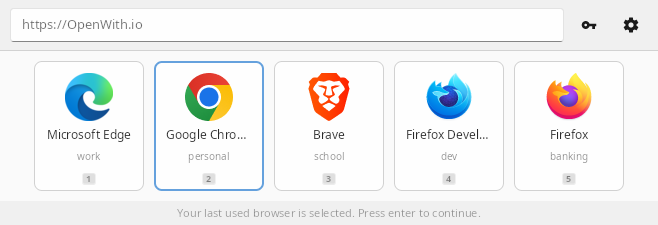
Quick Picker
Keyboard-driven browser selection. Up, down, enter. Done in milliseconds.
URL Pattern Rules
Route links by pattern. *notion.so* to one browser, *github.com* to another. First match wins.
Auto-Detection
Finds every browser on your system automatically. Add custom ones too.
Browser Profiles
Skip the clunky profile picker. Route links directly to Work, Personal, or any profile.
Blazing Fast
Built with Rust. Launches instantly, uses minimal memory. Never in your way.
System Integration
Once registered as your default, intercepts every http/https link.
Cross-Platform
Available for Windows, macOS, and Linux. Same experience everywhere.
Dark Mode
Follows your system theme. Light and dark, automatically.
Localized
Available in 12 languages: English, Spanish, German, French, Portuguese, Italian, Japanese, Chinese, Korean, Russian, Dutch, and Arabic. Uses your system language automatically.
URL Rewriting Pro
Redirect twitter.com to nitter, or medium.com to scribe. Privacy-friendly alternatives, automatically.
Get started in seconds
Free forever. Upgrade when you need more power.
Download for FreeMake it executable and run:
chmod +x ~/Downloads/OpenWith-linux.AppImage && ~/Downloads/OpenWith-linux.AppImage
Or right-click the file → Properties → Permissions → Allow executing, then double-click.
Free
$0
- Browser chooser popup
- 2 browsers
- 3 URL rules
- Dark mode
Pro
$20 one-time
- Everything in Free
- Unlimited browsers
- Unlimited rules
- Auto-open with delay
- URL rewriting
- 1 year of updates